

Local MCP server
Let coding agents on your computer, such as Claude Code or Cursor, read your APIs and test them through Studio, with you approving where their requests go.
MCP (the Model Context Protocol) is a standard way for AI agents to call tools that other programs provide.
Studio can run a small MCP server on your computer. A coding agent, such as Claude Code or Cursor, can then use the APIs in your library the way you do in Studio: read their specs, send requests, start local mocks, build and run collections, and check a running server against its spec. This includes specs you have only on your computer and haven't published anywhere.
Requests go through Studio, so they use your environments, proxy and certificate settings, and the responses are checked against the spec. You decide which hosts an agent may call, and everything it does is listed in the MCP tab.
The server is off by default. Nothing listens until you start it, or until you start a chat in the agent chat, which starts it and connects the agent for you.
Turning it on
- Open the MCP tab in the top bar, or go to Settings → MCP (
⌘,, orCtrl+,on Windows and Linux). - Choose Start.
The panel then shows:
- Address:
http://127.0.0.1:47321/mcp. If port 47321 is taken, Studio uses the next free port and tells you, so you can update your agent's settings. You can also choose a port. - Token: a secret the agent sends with every request. It is hidden until you choose to show it.
- Connect an agent: setup text for Claude Code, Cursor and other clients, ready to copy.
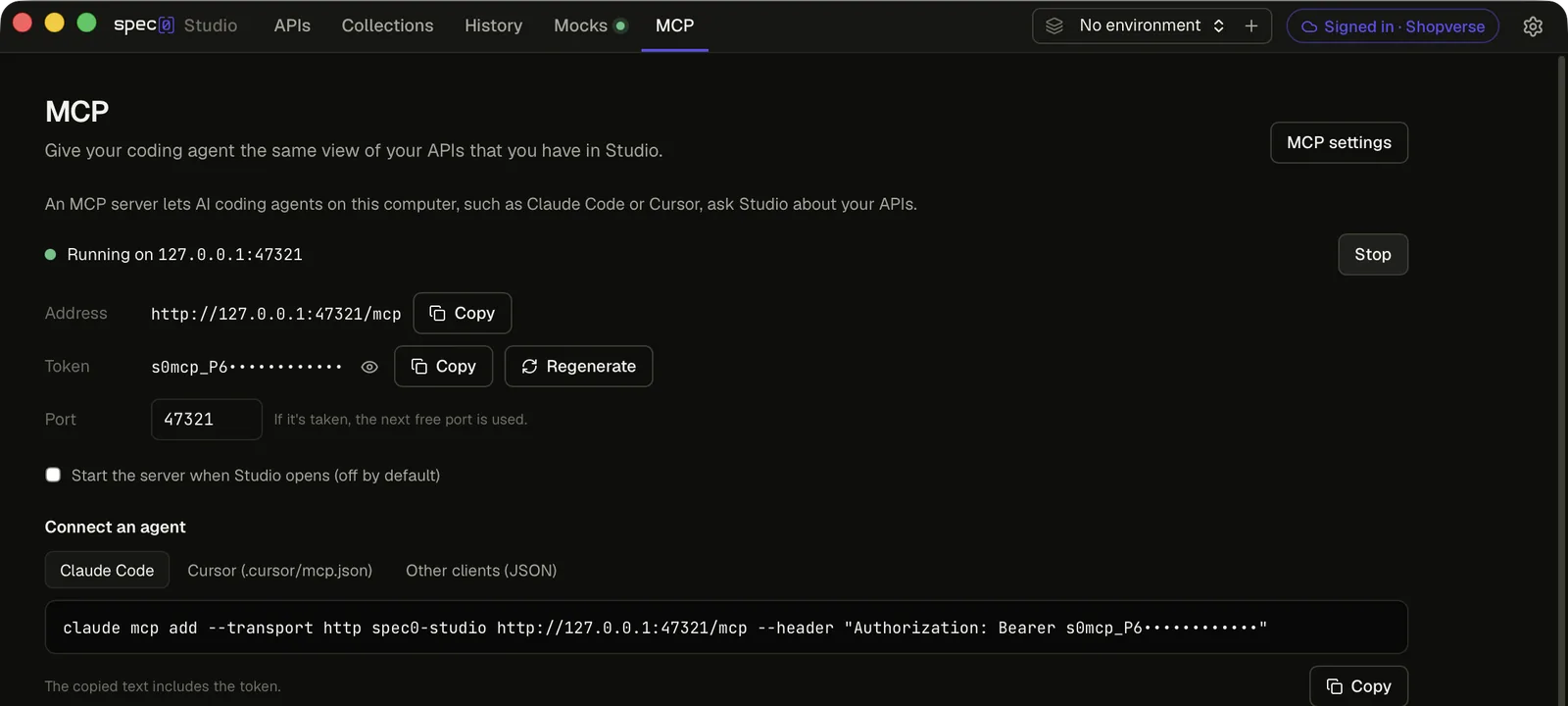
To stop the server, choose Stop. To have it start whenever Studio opens, tick Start the server when Studio opens. That is off by default too.
Connecting an agent
Copy the setup text from the panel. It already has your address and token in it. The examples below
show the same text with <your token> in place of the token. If Studio moved to another port, use
the address the panel shows.
Run this in a terminal:
claude mcp add --transport http spec0-studio http://127.0.0.1:47321/mcp --header "Authorization: Bearer <your token>"The copied text contains your token. Don't commit it to a repository or paste it anywhere public.
What it looks like
This recording was made before agents could send requests through Studio. Claude Code, connected to
Studio's MCP server, lists the APIs open in Studio and writes a curl command for the Orders API's
hosted mock, with the key left as an environment variable. Today it could also send the request
through Studio with send_request, after you allow the host.
What agents can use
The MCP tab lists every tool. Tools marked asks wait for your answer in Studio before they send a request, start a mock or write a file (see Approving what agents do). Tools marked sign-in work only while Studio is signed in to Spec0.
Reading your APIs
| Tool | What it does |
|---|---|
list_local_apis | Lists the APIs in your library: title, version, where each came from, number of operations, base URLs, and whether it has a hosted mock. |
get_api_spec | Returns the OpenAPI document for one API, exactly as stored. Large documents come back in parts. |
get_operation | Returns one operation: parameters, request body schema, responses, security schemes, and the full URL for each server. |
search_operations | Searches the operations of the APIs in your library by path, operationId, summary, tag and description. Given an API and no search text, it lists that API's operations. |
list_environments | Lists your environments, which one is active, and each variable's name. Values are included for ordinary variables only. |
get_connection_status | Says whether Studio is signed in to Spec0 or working locally. |
Sending requests and checking a server
| Tool | What it does | |
|---|---|---|
send_request | Sends one request for an operation through Studio and returns the status, headers, body and the schema check. Credential headers are hidden in what comes back, and the request is added to History. | asks |
check_contract | Sends a request for each operation to a base URL, such as http://localhost:8080, and reports the status and the schema check for each. Only GET, HEAD and OPTIONS run unless the agent asks for the others. | asks |
Local mocks
| Tool | What it does | |
|---|---|---|
list_local_mocks | Lists the local mocks that are running, and their addresses. | |
start_local_mock | Starts a local mock of an API and returns its address. | asks |
stop_local_mock | Stops an API's local mock. |
Collections
| Tool | What it does | |
|---|---|---|
list_collections | Lists your collections, which ones are drafts made by an agent, the file each is saved to, and its last run. | |
get_collection | Returns a collection's steps in order, with their targets, parameters, bodies, expected statuses and links. | |
create_collection | Creates a draft collection, empty or as a copy of another. | |
add_step, update_step, remove_step | Change the steps of a draft. | |
link_value | Fills a field of a step with a value from an earlier step's response, such as the new order's id. See Chaining. | |
set_expected_status | Sets the status a step expects, such as 404 or 4XX. | |
run_collection | Runs a collection and returns each step's status, whether it passed, and why not. | asks |
get_run_log | Returns a run's log: each step's request, response, schema check and the values passed between steps. | |
save_collection_to_folder | Saves a collection as a .spec0-collection.yaml file, for example in your repository. | asks |
Specs
| Tool | What it does |
|---|---|
reload_spec | Reads a spec again from its file or URL after it changed, and reports what changed: version, servers, and the operations and schemas added, removed or changed. |
validate_spec | Reports problems that stop a spec from loading or make operations hard to use, such as a reference that points nowhere or a path parameter nobody declared. |
Hosted mocks
| Tool | What it does | |
|---|---|---|
get_mock_server | For one API: the hosted mock's address, its key (if Studio has it), the header to send it in, and a curl command. | sign-in |
create_mock_server | Creates a hosted mock for an API that is already published to Spec0. If the API already has one, returns that one. | sign-in |
refresh_mock_server | Rebuilds an API's hosted mock from the latest version on Spec0. The address and key stay the same. | sign-in |
An API that is only on your computer has to be published from Studio before an agent can create a hosted mock for it. See Hosted mock servers.
Approving what agents do
Studio asks you in a dialog before an agent:
- sends its first request to a host. The dialog names the agent and the request, for example "Claude Code wants to send requests to localhost:8080". Hosts on your computer, where local mocks run, are asked about the same way.
- sends a
DELETE,PUTorPATCHto a host that isn't on your computer. This is asked separately, even when you've already allowed that host. - starts a local mock.
- saves a collection to a file. This is asked every time, and the dialog shows the path.
You can answer Don't allow, Allow once, or Allow for this session. A session lasts until you stop agents or quit Studio. Saving a file can only be allowed once.
The dialog opens with Don't allow selected, and Esc means the same, so pressing a key out of
habit never lets a request through. An approval nobody answers is refused after five minutes, and
the agent is told to ask you.
Blocked hosts and the request limit
In the MCP tab, under Agents:
- Blocked hosts lists hosts agents can never send to, one per line. Studio refuses them without asking. Use it for production, for example.
- Requests a minute caps how many requests all agents together can send. It's 60 unless you change it. Over the limit, a request is refused and the agent is told to wait.
Both are saved with your MCP settings.
Secret values
Agents never see secret values. An agent writes {{token}} in a request, and Studio fills in the
value from your active environment when it sends it. Responses, run logs and every tool result have
secret values replaced by their {{name}} before they leave Studio.
Collections agents build
A collection an agent creates is a draft. It appears in Collections while the agent builds it, with a banner that names the agent and two buttons:
- Keep makes it an ordinary collection.
- Discard deletes it, after you confirm.
Agents can change only their own drafts. A collection you made or kept, they can read and run, or copy into a new draft, but not change. Saving a draft to a file also keeps it.
Runs an agent started are marked with its name in the collection's Runs view and in the run log.
Seeing what agents did
The Agents section of the MCP tab shows:
- the agents that connected since Studio started, by the name their client gives, such as Claude Code
- an Activity log: each tool call, and each request with what was sent and what came back, with secret values replaced. It covers this session only.
The console also records each tool call and says which agent made it.
Stop agents refuses everything agents are waiting for, stops runs they started, forgets what you allowed this session, and stops the server. The same button is in every approval dialog.
Security
The server is built to be reachable only by programs on your computer that you gave the token to.
- Local only. It listens on
127.0.0.1, so other computers on your network can't reach it. - Token required. Every request must carry the token as
Authorization: Bearer <token>. The token is generated on your computer. A request without it, or with the wrong one, is refused. - New token at any time. Regenerate makes a new token. Agents using the old one stop working until you give them the new setup text.
- No web pages. Requests from a browser are refused, so a website you visit can't reach the server, even though it runs on your computer.
- Only while Studio runs. The server stops when you stop it or when Studio quits.
- Secret values stay secret. Variables you marked secret are listed by name only, and Studio fills them in when it sends a request. Their values are never shared with the agent.
Local and remote MCP servers
Spec0 has two MCP servers. They answer different questions.
| Studio's local MCP server | The Spec0 MCP server | |
|---|---|---|
| Knows about | What's in Studio on your computer: your library, including unpublished specs, your environments, collections and local mocks | Your whole organisation's APIs on Spec0, plus the public Spec0 docs |
| Runs | On your computer, while Studio is open | Hosted by Spec0 |
| Sends requests | Yes, through Studio, after you allow the host | No |
| Needs a Spec0 account | No, except for the hosted mock tools | Yes, for your organisation's APIs |
You can use both at once. Use the local server while you build and test an API on your computer, and the remote one to search every API in your organisation. See Spec0 MCP server for how to set up the remote one.
Connecting to Spec0
Sign in to add your organisation's APIs, their environments and hosted mocks to Studio. Optional; nothing else depends on it.
Agent chat
Chat with a coding agent you already use, such as Codex, Claude Agent or Gemini CLI, in a panel inside Studio, with Studio's tools and what you have open already connected.